 Vantix
IPTV Smarters alternative
Best IPTV Smarters Alternative for Android & Fire TV (2026)
IPTV Smarters is a widely used player. Vantix Player is built for the TV remote first: no ads in any version, a streaming-style home with glass-style panels, and channel switching that keeps the last frame on screen while the next channel loads. Try it on the same M3U or Xtream Codes source.
Vantix is a player. It does not provide channels, playlists or subscriptions.
Vantix Player vs IPTV Smarters
Same source, two players. Here is what Vantix does on each point that usually decides it.
| Feature | Vantix Player | IPTV Smarters |
|---|---|---|
| Look and layout | Glass-style panels and a streaming-style home with a featured row and continue watching, the same on TV and phone. | Not compared here. |
| Channel zapping | The last frame stays on screen while the next channel loads, and the new name, logo and programme appear at once. | Not compared here. |
| Ads | No ads, in any version. | Not compared here. |
| Price on Android | No ads. Free on Google Play. On Fire TV: 15 days free, then Lifetime $19.99 once, or optional Yearly $9.99 or Monthly $2.49. | Not compared here. |
| M3U and Xtream Codes | Both. M3U as a link or a file, and Xtream Codes accounts. | Both. |
| iPhone, iPad and Apple TV | Vantix Player for Apple devices is in App Store review (coming soon). Vantix Cast is on the App Store now and is not an IPTV player. See Apple TV IPTV. | Has iOS and Apple TV apps. Check the store listings for the current state. |
| QR code setup | Yes. Scan a QR code with your phone and fill in the form there, or type on the remote. | Not compared here. |
Both are players: neither supplies channels. The Vantix column is what the app does today. In the IPTV Smarters column we list only what is widely documented, and "Not compared here" means we have not tested it. Check each app's current features and prices before you decide.
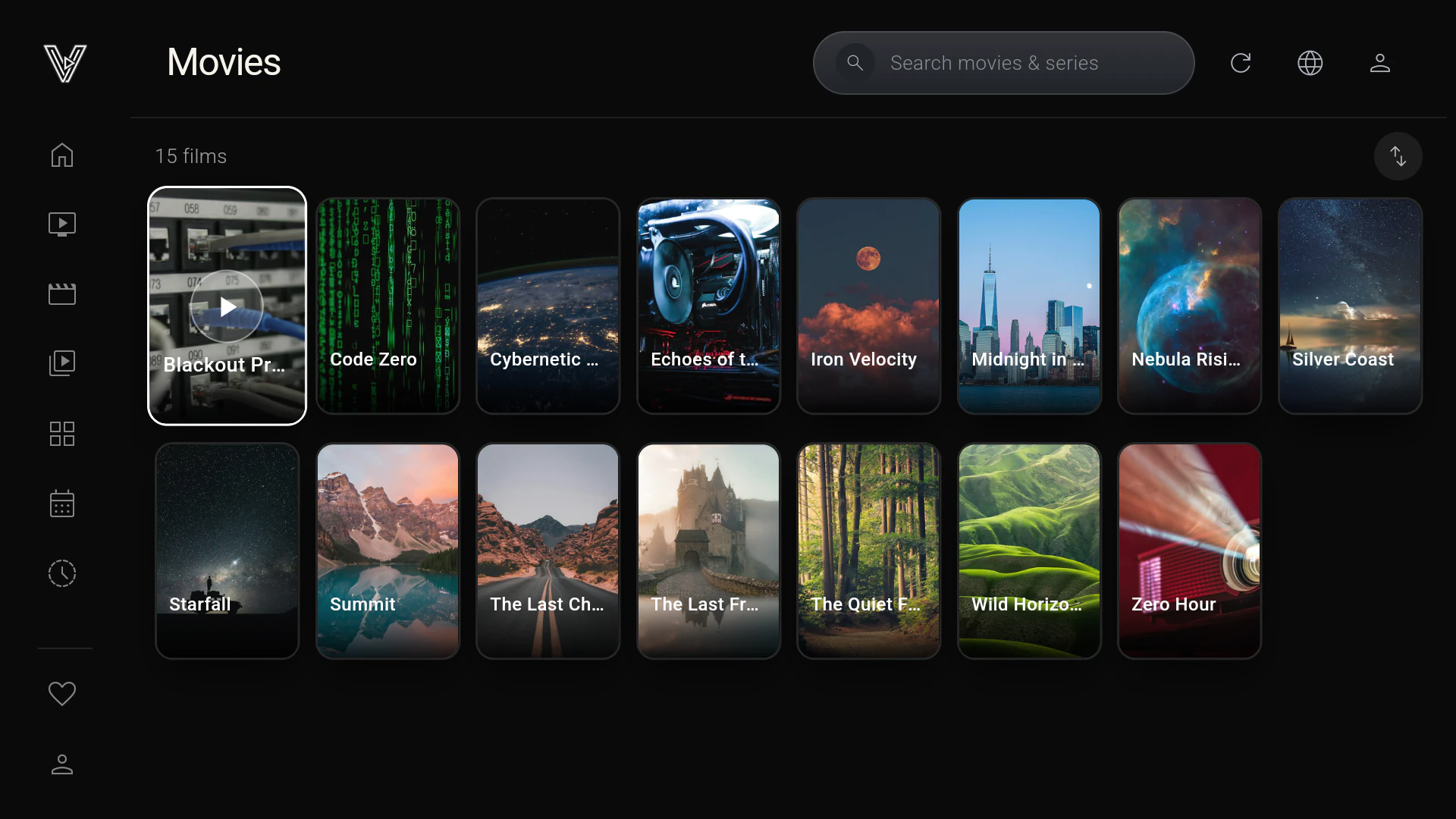
How to Download and Install a Reliable IPTV Player on Firestick (2026)
Search for IPTV Smarters Pro on a Firestick and you often find nothing in the Amazon Appstore. So most guides on how to install IPTV Smarters Pro on Firestick tell you to turn on "Apps from Unknown Sources" and download an APK from a website. You then depend on whoever hosts that file: it may be outdated, repackaged by a third party, or not the real app at all, and it gets no automatic updates.
Vantix Player is official on the Amazon Appstore (ASIN B0HNYTGMV1), so nothing is sideloaded and Amazon delivers its updates:
- Search for Vantix on your Fire TV, or open the Downloader app and enter code 7305741. The code opens the Vantix page in the Amazon Appstore.
- Choose Get or Download. "Apps from Unknown Sources" can stay off.
- Open Vantix and scan its QR code with your phone to add your own M3U link or Xtream Codes login.
- Use every feature free for 15 days, then unlock Vantix Pro on the TV through Amazon if you keep it.
The Fire TV and Android versions are live on the Amazon Appstore and Google Play. Vantix Player for iPhone, iPad and Apple TV is in App Store review (coming soon). The full walkthrough with screenshots is at vantix.tv/firestick.
IPTV Smarters Pro vs. Vantix: UI & Performance Breakdown
Vantix has a zero-ad policy: no banners, no video ads and no pop-ups, in any version, free or paid. That matters with IPTV Smarters because many of the builds passed around on APK sites are unofficial repacks, and some of them add intrusive banner ads or worse.
- Two playback engines. Native Media3 ExoPlayer for hardware decoding, with libmpv as a second engine for streams that need it. 4K and HEVC channels are decoded in hardware where the device's chip supports them.
- Channel changes. The last frame stays on screen while the next channel loads, and the new channel's name, logo and programme appear at once.
- Big playlists. Playlists are parsed in the background and saved to a local SQLite database in chunks of 500 rows, so the TV stays responsive while a large M3U loads.
- Built for the remote. A streaming-style home with a featured row and continue watching, an EPG guide with catch-up where your provider archives it, and Multi-View with two or four channels.
How smoothly a stream plays also depends on your provider and your device. The best test is your own source in both players.
How to Fix "IPTV Smarters Failed to Authorize" on Firestick
"Failed to authorize" means the provider's Xtream Codes server did not accept the login. On a Firestick the usual causes are a wrong server address or port, http and https mixed up, a mistyped username or password, an expired account or one at its connection limit, a request that timed out, or a secure (SSL/TLS) certificate the player could not verify. To fix it, enter the server URL and port exactly as your provider sent them, retype the username and password, and try the same login in a second player: if it is refused there too, only the provider can fix it. Vantix Player, installed from the Amazon Appstore with Downloader code 7305741, does not stop at one general error. It gives up after 25 seconds instead of hanging, and says whether the credentials were rejected, the server has no Xtream API at that address, the provider timed out or is down, or its certificate could not be verified. After you sign in, the catalogue is saved to a local SQLite database in the background, so browsing reads from the TV instead of asking the server again.
These checks apply in any app:
- Server address. An Xtream Codes login needs the server URL with its port, such as http://example.com:8080. A missing port, http written as https or the other way round, or a path after the port each make the login fail.
- Username and password. Both are case-sensitive, and a space copied at the end is enough to be refused.
- Account status. An expired or suspended account, or one already at its connection limit, is refused until the provider sorts it out.
- Blocked apps or networks. Some providers refuse certain player apps, VPNs or networks. Only they can tell you.
The Vantix Xtream API handler helps on the parts a player controls. It trims spaces, trailing slashes and extra paths from the server address before signing in, and reads the server, username and password straight from a pasted get.php link. When a login still fails, it says which part failed instead of one general error: the username and password were rejected, the server was reached but has no Xtream API at that address, the provider timed out or is down, or its secure certificate could not be verified.
If your provider refuses the same login in every app, the account or the server is the problem, and only the provider can fix it.
What Vantix adds
Built for the remote
A streaming-style home with a featured row and continue watching, and channel switching that keeps the last frame on screen while the next loads.
Everything in one player
- An EPG guide from your provider, with catch-up where they archive it
- Multi-View with two or four channels, if your provider allows that many connections
- Google Cast from the phone app
- Cloud Sync for favourites and playback positions, and a parental PIN
Switching takes about three minutes
Keep your source
Your playlist or Xtream account stays with your provider. Add the same M3U link or Xtream login in Vantix by QR code from your phone, and try it next to your current player.
Questions
What is the best IPTV Smarters alternative for Fire TV?
Vantix Player is an IPTV Smarters alternative worth testing on the same source. It plays your own M3U playlist or Xtream Codes account on Fire TV, Android TV, Google TV and Android phones, has no ads in any version, and keeps the last frame on screen while the next channel loads. On Fire TV it comes from the Amazon Appstore with 15 days free and every feature unlocked.
Why is IPTV Smarters Pro not on the Amazon Appstore?
Only its developer can say why. Amazon reviews every app against its security and content policies before listing it, and an app that is not listed was either never submitted or not accepted. IPTV Smarters has also been removed from Google Play before, after a complaint. That is why most Firestick guides install it by sideloading an APK. Vantix Player is listed on the Amazon Appstore and passed Amazon's review, so you install it and get its updates through Amazon. Its iPhone, iPad and Apple TV versions are in App Store review (coming soon).
Why does IPTV Smarters say "failed to authorize"?
The provider's server refused the login. The usual causes are a wrong server address or port, http and https mixed up, a mistyped username or password, or an account that has expired or reached its connection limit. Try the same login in another player: if it is refused there too, contact your provider. Vantix tells you which of these it hit, see How to fix "Failed to Authorize" on Firestick.
How do I fix "IPTV Smarters failed to authorize" on Firestick?
"Failed to authorize" means the provider's Xtream Codes server did not accept the login. On a Firestick the usual causes are a wrong server address or port, http and https mixed up, a mistyped username or password, an expired account or one at its connection limit, a request that timed out, or a secure (SSL/TLS) certificate the player could not verify. To fix it, enter the server URL and port exactly as your provider sent them, retype the username and password, and try the same login in a second player: if it is refused there too, only the provider can fix it. Vantix Player, installed from the Amazon Appstore with Downloader code 7305741, does not stop at one general error. It gives up after 25 seconds instead of hanging, and says whether the credentials were rejected, the server has no Xtream API at that address, the provider timed out or is down, or its certificate could not be verified. After you sign in, the catalogue is saved to a local SQLite database in the background, so browsing reads from the TV instead of asking the server again.
Does Vantix support Xtream Codes and M3U like IPTV Smarters?
Yes. Vantix plays M3U playlists, as a link or a file, and Xtream Codes accounts. IPTV Smarters supports both formats too, so you can try the same source in each. Vantix provides no playlists or channels: you add your own, from a source you are authorized to use.
Does Vantix have ads?
No. Vantix shows no ads in any version. On Google Play it is free. On Fire TV, from the Amazon Appstore, you get 15 days free, then Vantix Pro: Lifetime for a one-time $19.99, or an optional Yearly subscription at $9.99 or Monthly at $2.49.
Does Vantix include channels or an IPTV subscription?
No. Vantix is a media player only. It provides zero channels, streams or subscription content, and it is not affiliated with any provider.
Vantix does not provide channels, movies, streams, playlists or IPTV subscriptions, and is not affiliated with any provider. Use it only with sources you are authorized to watch. IPTV Smarters is a trademark of its owner, and Vantix is not affiliated with it.