 Vantix
 Cast for iPhone and iPad
Cast web videos to your TV
Open any site in the Vantix Cast browser. It finds the videos on the page, blocks the ads around them, and sends the one you pick to your Chromecast, smart TV, Roku, AirPlay or any web browser in full quality.
15 days free with every feature. No account, no card, no ads. Rated 5.0 on the App Store from 14 ratings.
How to cast web videos to your TV
Your iPhone and your TV need to be on the same Wi-Fi. That is the only setup.
-
Open the page
Type a site or a search in the Web Caster tab. Ads and pop-ups are blocked while you browse.
-
Tap the video badge
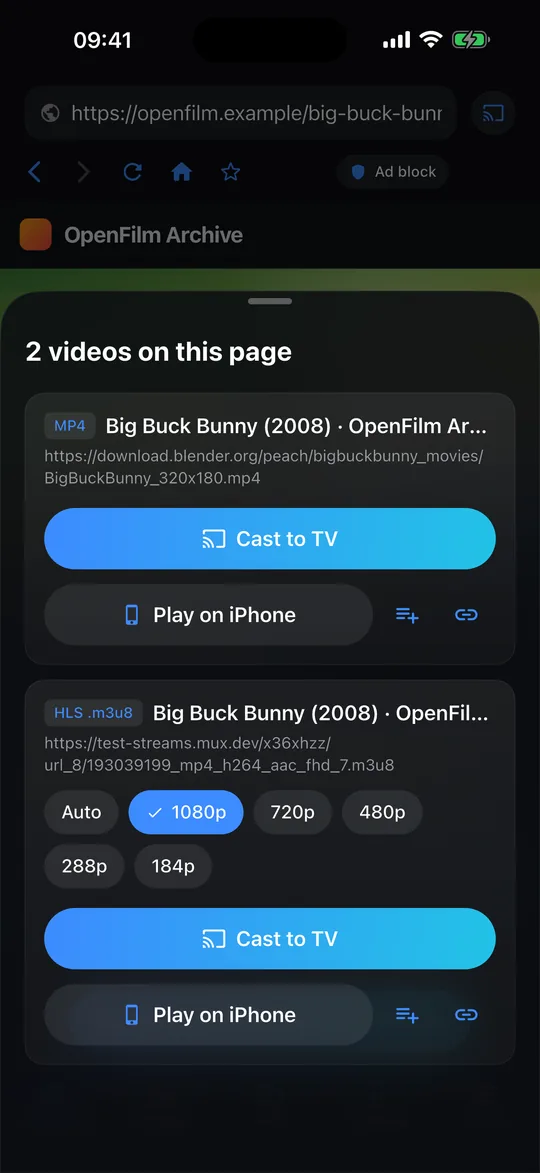
When the page loads a video, a badge shows how many were found. Tap it, and pick a quality if the stream offers several.
-
Choose your TV
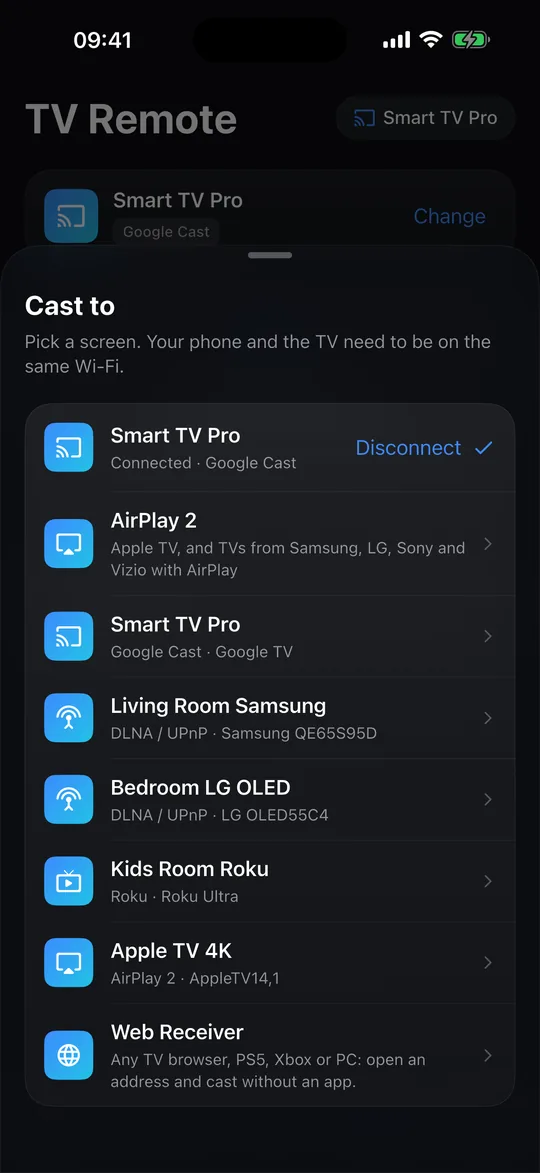
Tap Cast to TV and choose a screen. It plays there, and the TV Remote tab controls it.
The smart TV caster for 2026: one app for every screen
Vantix Cast speaks the four ways TVs accept video, and finds them on your network by itself.
| How it casts | Which screens |
|---|---|
| Google Cast | Chromecast, Chromecast with Google TV, and Google TVs from TCL, Sony, Hisense and others. Videos, photos and subtitles. |
| DLNA / UPnP | Smart TVs that accept DLNA, such as most Samsung and LG sets. Videos and photos. |
| Roku | Roku players and Roku TVs, through the Roku Media Player. Videos. |
| AirPlay 2 | Apple TV and TVs with AirPlay 2 from Samsung, LG, Sony and Vizio. Videos, through Apple's own AirPlay menu. Apple TV has no web browser, so this is how you browse on the iPhone and cast web videos to Apple TV. |
| Web Receiver | Any screen with a web browser: TV browsers, Fire TV (Silk), Xbox, PS5, computers and Tesla cars. Videos, photos and subtitles. |
More than web videos
A web video caster that finds the stream
The browser watches what a page loads and lists the real video files: HLS (.m3u8), MP4, MKV and WebM. For adaptive streams it offers each quality, best first. It blocks ad networks and pop-ups, so the video is what you get.
Photos and videos from your camera roll
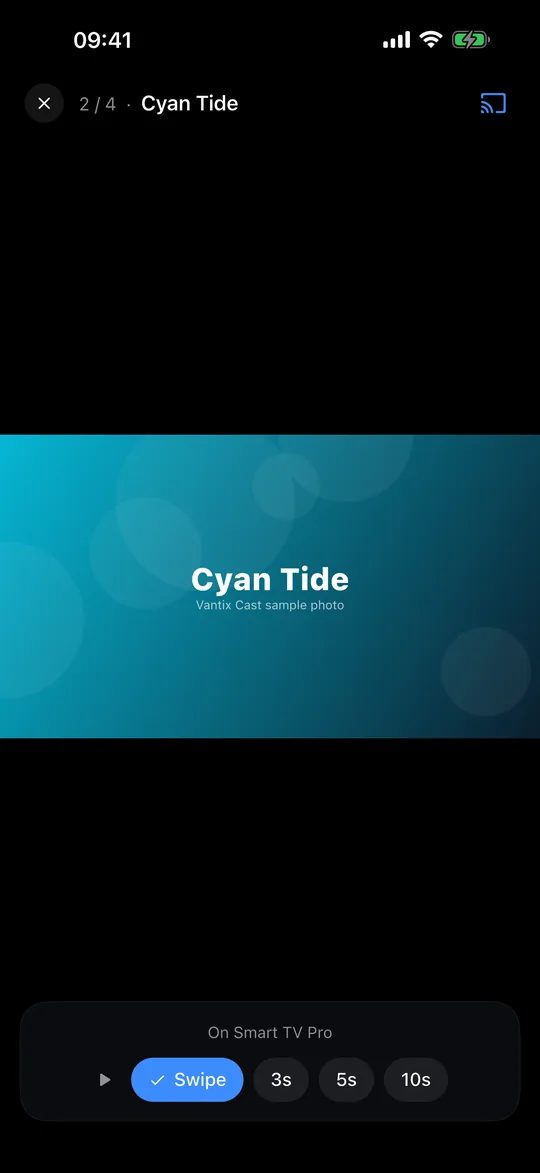
Your photos and videos go to the TV in full quality, straight from your iPhone over Wi-Fi, with nothing re-encoded or uploaded. Swipe through them, or let the slideshow move on every 3, 5 or 10 seconds. iPhone HEIC photos are converted to JPEG first, so every TV can show them.
Files, links and subtitles
Cast an MKV, MP4, MOV or WebM file from the Files app, or paste a stream link. Add an .srt or .vtt subtitle file and it shows on Google Cast, the Web Receiver and the iPhone player.
A TV remote that knows what is playing
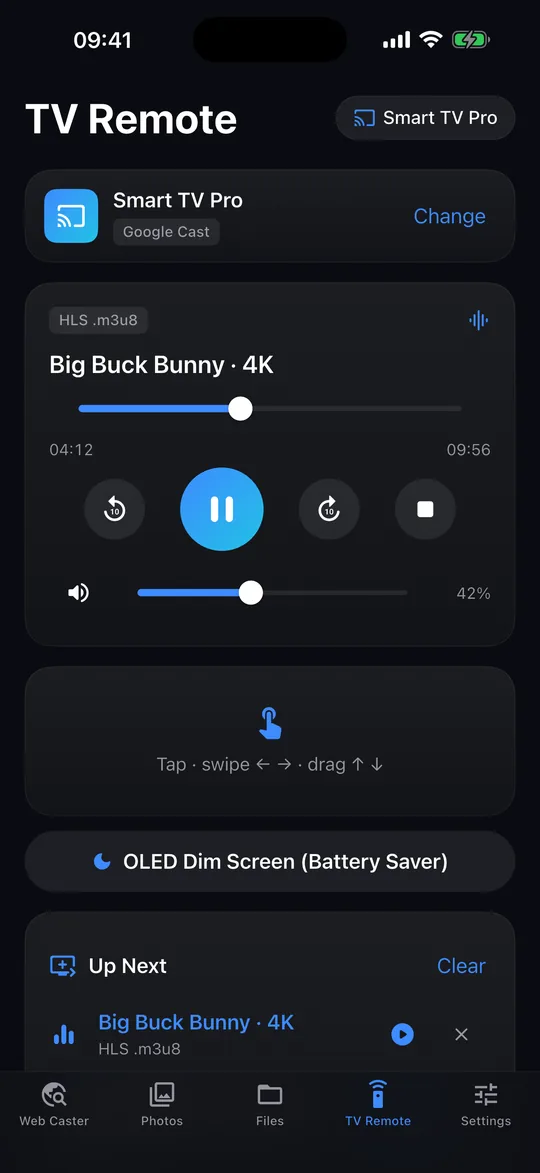
- Scrub, play, pause and skip 10 seconds
- TV volume and mute where the TV allows it
- An Up Next queue that plays the next item when one ends
- A touch pad, and a black screen saver for long films
Web Receiver for PS5, Xbox and Tesla
No Chromecast? Any browser can be the receiver. The page runs on your iPhone, on your own network: nothing you cast passes through vantix.tv.
Set it up in three steps
- Connect the console, TV, computer or car to the same Wi-Fi as your iPhone
- In Vantix Cast, tap Cast, then Web Receiver. It shows a 5-digit TV code and an address
- On the big screen, open vantix.tv/receiver and enter the code, or the address
Good to know
- PS5 and Xbox: use the console's web browser. The remote's arrow keys reach every button on the receiver page
- Tesla: park first. The car only plays video in its browser while parked, and it needs the same Wi-Fi as your iPhone
- On your iPhone's hotspot: type the address the app shows instead of the code
- Keep Vantix Cast open while a local file or photo plays: the TV fetches it from your iPhone
What Vantix Cast costs
15 days free, then Vantix Cast Pro
Every feature is unlocked for 15 days, with no account and no card. After that, choose one option in the App Store:
Prices are in US dollars; the App Store shows your local price. Lifetime has no renewal. Yearly and Monthly renew automatically unless cancelled at least 24 hours before the end of the period, in your Apple account settings.
What you need
- An iPhone or iPad with iOS 15 or later
- A TV, player or browser on the same Wi-Fi network
- Permission to find devices on your local network, which iOS asks for the first time
- No ads, ever, and no account
Questions
Which TVs does Vantix Cast work with?
Chromecast and Google TV (including TCL, Sony and Hisense Google TVs), DLNA / UPnP smart TVs such as Samsung and LG, Roku, Apple TV and AirPlay 2 TVs, and any TV, console, computer or car with a web browser through the Vantix Cast Web Receiver at vantix.tv/receiver.
Can I use the Web Receiver on a PS5, an Xbox or in a Tesla?
Yes, if the browser can reach your iPhone. Connect the console or the car to the same Wi-Fi as your iPhone, open vantix.tv/receiver in its browser and enter the 5-digit TV code from the app, or the address it shows. In a Tesla, park first: the car only plays video in its browser while parked.
Does it mirror my iPhone screen?
No. Vantix Cast sends the video itself, so the TV plays it in full quality while you keep using your phone. Local files and photos are served from your iPhone over your Wi-Fi, so keep the app open while they play.
Do I need an account or a card for the trial?
No. Everything is unlocked for 15 days with no account and no card. After that you can choose Lifetime, Yearly or Monthly in the App Store.
Can it cast Netflix, Disney+ or other protected services?
No. Videos protected with DRM cannot be cast by any third-party app. Use the service's own app for those.
How do I browse and cast web videos to Apple TV?
Apple TV has no web browser, so browse on your iPhone or iPad in the Vantix Cast browser. Tap the video badge on the page and choose your Apple TV: the video plays there through AirPlay 2 while you keep using the phone.
Is Vantix Cast an m3u8 downloader?
No. It does not download or save videos. It finds HLS (.m3u8) streams on a page and plays them on your TV directly, offering each quality, so to watch a stream on the TV you do not need to download it first.
Vantix Cast plays and casts media you have the right to watch. It does not provide any videos, channels or streams and cannot cast DRM-protected services. Google Cast, Chromecast and Google TV are trademarks of Google LLC. AirPlay, Apple TV, iPhone and iPad are trademarks of Apple Inc. Roku is a trademark of Roku, Inc. PS5 is a trademark of Sony Interactive Entertainment Inc. Xbox is a trademark of Microsoft Corporation. Tesla is a trademark of Tesla, Inc. Vantix is not affiliated with any of them.