 Vantix
IBO Player Pro alternative
IBO Player Pro Alternative with No MAC Address Activation
IBO Player Pro, Smart IPTV and DuplexPlay tie your activation and your playlist to one TV's MAC address. Vantix Player skips that: Pro is bought in the official store on the TV, and you add your playlist from your phone by scanning a QR code.
Fire TV Downloader code 7305741 opens the Amazon Appstore listing. Vantix is a player: it does not provide channels, playlists or subscriptions.
Vantix Player vs MAC-activated players
All of these are players: none supplies channels. The Vantix column is what the app does today. The other column covers IBO Player Pro, Smart IPTV and DuplexPlay together, using only how their activation is widely documented. Each app differs in the details, so check its own site.
| Feature | Vantix Player | IBO Player Pro, Smart IPTV, DuplexPlay |
|---|---|---|
| What activation is tied to | Your store account. On Fire TV, Pro is an Amazon in-app purchase. | The TV's MAC address or a device key shown in the app. |
| Where you pay | On the TV, in Amazon's own purchase window. Free on Google Play. | On the developer's website, entering the TV's address. |
| Adding the playlist | Scan a QR code on the TV and fill in the form on your phone. The TV loads it straight away. Typing on the remote also works. | Upload the M3U link or login on the developer's website against the address, then reload the app. |
| A second TV | Install from the store and add the playlist by QR code. | Each TV has its own address, so each needs its own activation. |
| TVs supported | Fire TV, Android TV, Google TV, Android phones and tablets. Not Samsung, LG or Roku. | Varies by app. Smart IPTV and IBO Player also run on Samsung and LG TVs. |
| Ads | No ads, in any version. | Not compared here. |
IBO Player, Smart IPTV and DuplexPlay are trademarks of their owners, and Vantix is not affiliated with them. Activation steps and prices change, so check each developer's own site. Vantix is free on Google Play and free for 15 days on Fire TV, so you can try it on the same source before you switch.
Official Pricing Breakdown: Vantix vs IBO Player Pro
What IBO Player Pro costs, and what Vantix Pro costs on Fire TV, as of November 2026:
- IBO Player Pro cost: one activation per device. It is sold on the developer's website against the TV's MAC address or device key. The App Store listings for the two IBO apps also show an in-app "Activation" at €6.99 or €9.99, depending on the app and the country. Check the developer's site for whether a plan lasts one year or for life.
- Vantix 1-year plan: Yearly $9.99, bought in the app on the Fire TV through Amazon's in-app purchase. It renews until you cancel it in your Amazon account.
- Vantix lifetime plan: Lifetime $19.99, a one-time purchase on the TV, with no renewal. Monthly $2.49 is also available.
- Free period: Vantix gives every feature free for 15 days on Fire TV before you pay. On Android TV, Google TV and Android phones it is free on Google Play.
- Activation method: IBO uses a MAC ID or device key entered on an external website. Vantix uses QR phone pairing: scan the code on the TV and fill in your playlist on the phone, with no typing on the TV.
IBO prices are taken from its public App Store listings in November 2026 and vary by country and by app. Check the developer's own site before you buy.
Smart IPTV Activation: Why Your Playlist Is Tied to a MAC Address
Smart IPTV, IBO Player Pro and DuplexPlay all work the same basic way. The app shows a MAC address or a device ID and key on the TV. You go to the developer's website, pay for activation against that address, and upload your playlist there. The app on the TV then downloads whatever is saved for its address.
That design is why people search for help with it:
- The activation belongs to one TV. A new TV, a second room or a replaced box has a different address and needs its own activation.
- Every playlist change goes through the website: copy the address off the TV screen, type it correctly, upload, then reload the app.
- Some yearly plans expire and have to be renewed per device. Check the developer's terms for what you bought.
- Your playlist login is stored on the developer's server, linked to your TV's address.
These points describe how MAC-based activation is widely documented. Each app's current steps, prices and terms are on its developer's own website.
Official Store Billing Instead of MAC Address Tracking
Vantix never asks for a MAC address, a device key or an activation code. You pay through the store your device already uses:
- Fire TV: install from the Amazon Appstore (ASIN B0HNYTGMV1) or with Downloader code 7305741. Every feature is free for 15 days. Then pick a plan with the remote and confirm in Amazon's purchase window: Lifetime for a one-time $19.99, or optional Yearly $9.99 or Monthly $2.49.
- Android TV, Google TV and Android phones: free on Google Play.
- iPhone, iPad and Apple TV: Vantix Player is in App Store review (coming soon). Pro will be bought through Apple's in-app purchase.
The purchase belongs to your Amazon account rather than to the TV's network hardware, and subscriptions are managed in your Amazon account settings like any other app.
Add Your Playlist with Your Phone: QR Pairing in About a Minute
There is no website to visit and no address to copy. The TV and your phone talk to each other directly:
- Open Vantix on the TV and choose Connect with phone. A QR code appears.
- Scan it with your phone's camera. A short form opens in the phone's browser.
- Enter your M3U link or your Xtream Codes server, username and password, then send it.
- The TV loads your live channels first, while movies, series and the guide finish in the background.
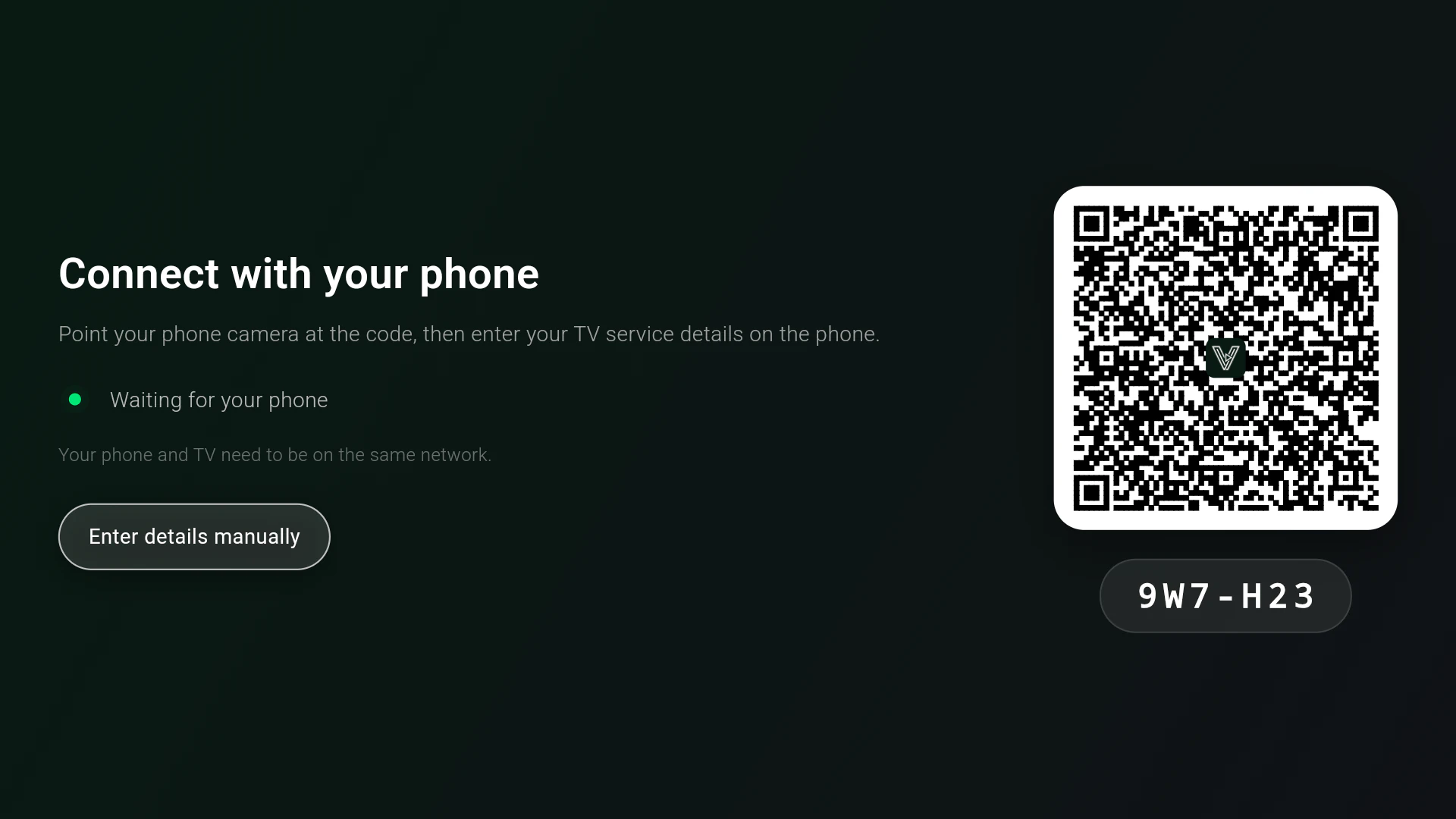
Your phone and the TV need to be on the same Wi-Fi. You can also type the details with the remote, using the on-screen keyboard.
Try Vantix on your own device
Firestick and Fire TV
Four steps with the Downloader app, then add your M3U or Xtream source by QR code. About 3 minutes.
Android TV and Google TV
Free on Google Play, with no ads. Works on Google TV sticks, Android TV boxes and Android phones.
Questions
What is a good IBO Player Pro alternative for Firestick?
Vantix Player is one to try on Fire TV, Android TV and Google TV. It is not activated by MAC address: you install it from the Amazon Appstore (or Downloader code 7305741), use every feature free for 15 days, then buy Vantix Pro on the TV through Amazon if you want to keep it. Your playlist goes in from your phone by QR code, with no website upload.
Why does IBO Player ask for a MAC address?
IBO Player Pro, Smart IPTV and DuplexPlay identify each TV by its MAC address or a device key shown in the app. You pay for activation and upload your playlist on the developer's website against that address, and the app on the TV downloads it from there. The activation belongs to that one TV, so another TV needs its own.
How does Smart IPTV activation work?
Smart IPTV (SIPTV) shows the TV's MAC address on screen. You pay the activation fee for that address on the developer's website and upload your playlist there too. The app then loads the playlist for that MAC address. Check the developer's own site for current prices and terms.
Does Vantix need a MAC address or activation code?
No. Vantix never asks for a MAC address, a device key or an activation code. On Fire TV, Vantix Pro is bought in the app through Amazon and belongs to your Amazon account. On Google Play the app is free. Versions for iPhone, iPad and Apple TV are in App Store review, and there Pro will be bought through Apple.
Is there a DuplexPlay alternative for Firestick?
Yes. Vantix Player is listed in the official Amazon Appstore, so it installs on a Firestick without sideloading. It plays your own M3U or Xtream Codes source, and you add it by scanning a QR code with your phone instead of entering a device ID and key on a website.
Does Vantix work on Samsung or LG TVs?
No. Vantix runs on Android TV, Google TV, Fire TV and Android phones and tablets. It does not run on Samsung (Tizen) or LG (webOS) TVs, where MAC-activated players such as Smart IPTV are common. On those TVs, a Fire TV Stick or a Google TV device in the HDMI port runs Vantix.
Does Vantix include channels?
No. Vantix is a media player only. It provides zero channels, streams, playlists or subscriptions: you add your own source, one you are authorized to use.
Vantix does not provide channels, movies, streams, playlists or IPTV subscriptions, and is not affiliated with any provider. Use it only with sources you are authorized to watch. IBO Player, Smart IPTV and DuplexPlay are trademarks of their owners. Amazon, Fire TV and Firestick are trademarks of Amazon.com, Inc.