 Vantix
Apple TV and iOS
Next-Gen IPTV Player for Apple TV & iOS
Vantix Player today runs on Android TV, Google TV, Fire TV and Android phones. Versions for Apple devices (iOS, iPadOS, macOS and Apple TV) are in App Store review and are not released yet. Vantix Cast, a separate app, is on the App Store now.
Vantix Cast casts web videos, photos and files. It is not an IPTV playlist player.
Vantix Player for Apple devices
IPTV on Apple devices is on the way. Here is where it stands.
Status
The iOS, iPadOS, macOS and Apple TV versions are in App Store review. There is no release date yet, and the feature list and prices will be published when they go live. Nothing on this page is a promise of a date.
What it will play
Like the Android version, it is a player for your own M3U playlist or Xtream Codes account. It provides no channels, streams or subscriptions.
On Apple devices today: Vantix Cast
AirPlay 2 to Apple TV
Cast a web video, a camera-roll photo or a file from your iPhone or iPad to an Apple TV, or to a TV with AirPlay 2 from Samsung, LG, Sony or Vizio. Video goes through Apple's own AirPlay menu.
Bought through the App Store
15 days free with every feature, no account and no card, then Lifetime, Yearly or Monthly, billed by Apple. No ads, ever. Vantix Cast does not play IPTV playlists.
How to browse the web on Apple TV
Apple TV has no web browser. tvOS ships without Safari, and apps for it cannot use Apple's web engine, so no full browser is available in its App Store. The practical way is to browse on your iPhone and send what you want to watch to the TV.
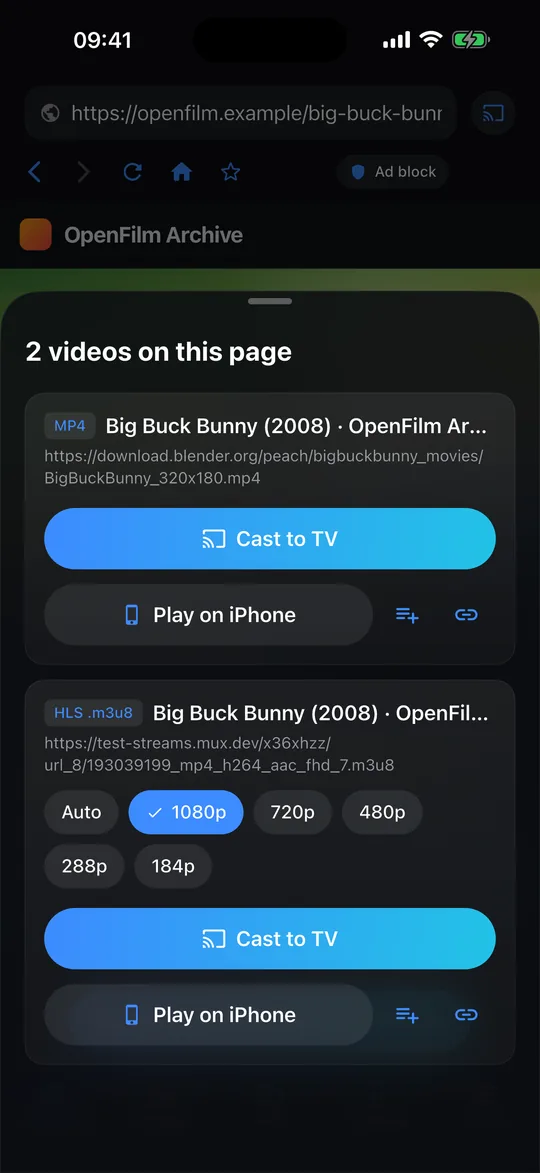
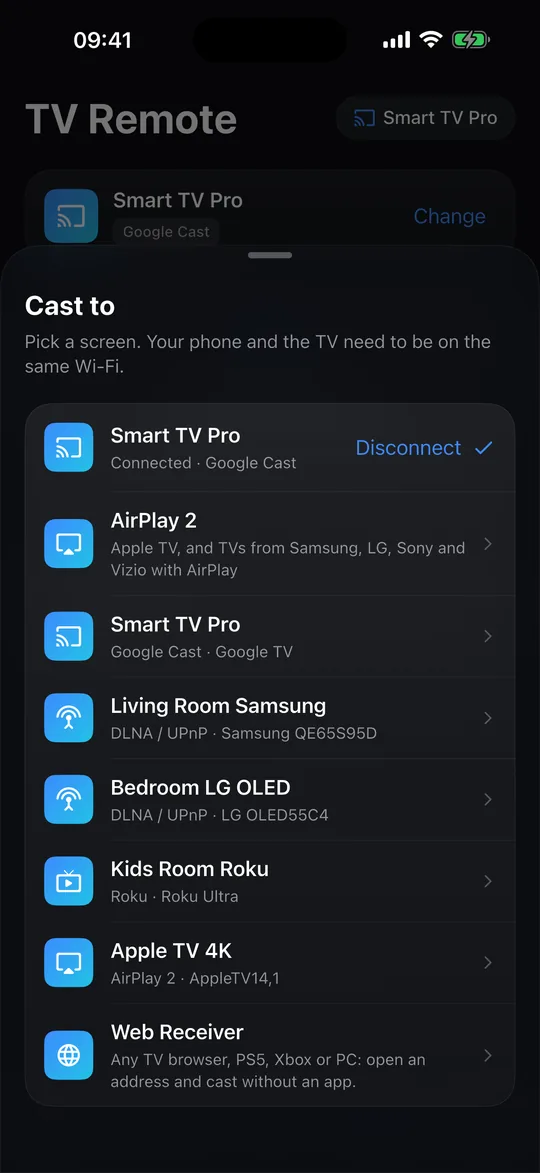
- Web videos: Vantix Cast. Open the site in the Vantix Cast browser on your iPhone or iPad. It lists the videos on the page, blocks the ads around them, and sends the one you pick to the Apple TV with AirPlay 2, so you browse and cast web videos to Apple TV without mirroring your whole screen.
- A whole web page: Screen Mirroring. To show a page itself rather than a video, use Screen Mirroring in the iPhone's Control Center. The TV then copies the phone's screen.
- HLS streams. If you were looking for an m3u8 downloader just to watch a stream on the TV, you may not need the file: Vantix Cast finds HLS (.m3u8) streams on a page and plays them on the Apple TV directly, in the quality you choose. It does not download or save videos.
Need IPTV on a TV today?
Fire TV and Firestick
Install Vantix from the Amazon Appstore with the Downloader app, then add your own M3U or Xtream source by QR code.
Android TV and Google TV
Install Vantix from Google Play. It is free and has no ads.
Questions
Is there an IPTV player for Apple TV?
Vantix Player for Apple TV is in App Store review and is not released yet. Until then, Vantix Cast on the App Store can send web videos, photos and files from an iPhone or iPad to an Apple TV with AirPlay 2. Vantix Cast is not an IPTV player and does not play M3U playlists or Xtream Codes accounts.
Is Vantix available on iPhone and iPad?
Vantix Cast is: it is a separate app for iPhone and iPad (iOS 15 or later) that casts web videos, photos and files to a TV. Vantix Player, the IPTV player, is in App Store review for Apple devices (iOS, iPadOS, macOS and Apple TV) and is not released yet.
Can I watch IPTV on an Apple TV today with Vantix?
Not with Vantix Player yet. Today Vantix Player runs on Android TV, Google TV, Fire TV and Android phones and tablets. On an Apple TV you can cast web videos and files from Vantix Cast on your iPhone.
When will Vantix Player be on the App Store?
There is no release date yet. The Apple versions are in App Store review. This page will say when they are live.
Does Apple TV have a web browser?
Not on the Apple TV itself: tvOS has no Safari and no full web browser. Browse on your iPhone or iPad instead. Vantix Cast finds the videos on a web page and sends the one you pick to the Apple TV with AirPlay 2, and Screen Mirroring shows a whole page. There is more above.
Vantix does not provide channels, movies, streams, playlists or IPTV subscriptions, and is not affiliated with any provider. Use it only with sources you are authorized to watch. Apple, Apple TV, iPhone, iPad and Mac are trademarks of Apple Inc.